Solutions
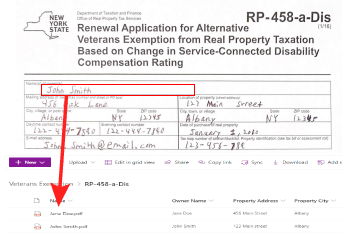


With Azure Form Recognizer, you can easily convert handwriting to text, streamlining your workflow and increasing productivity. This tool integrates seamlessly with various platforms, ensuring the extracted data is immediately available where you need it.
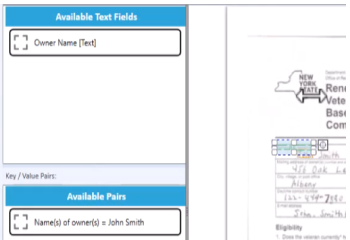
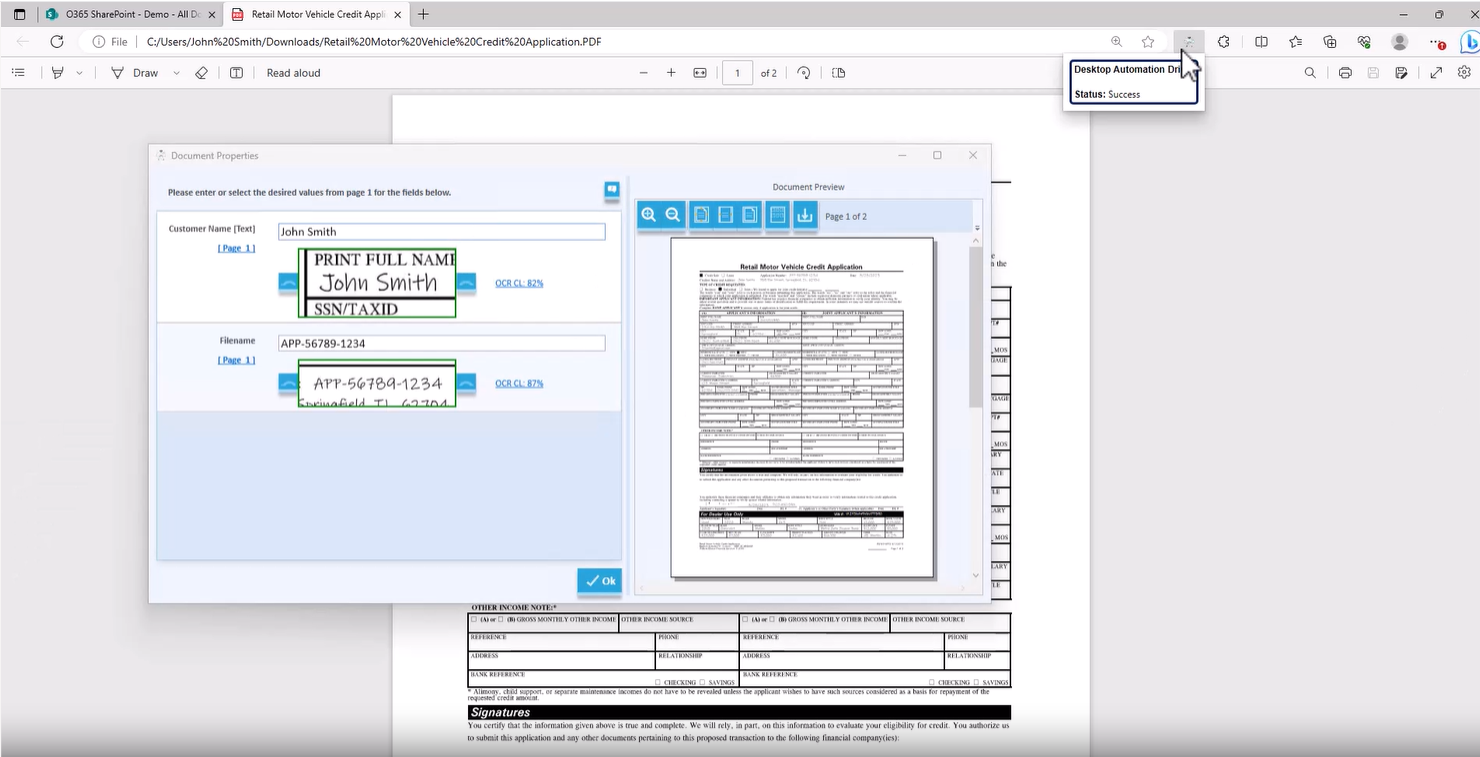
Explore AI's role in processing handwritten forms to SharePoint. Learn how Azure Form Recognizer & Desktop Automation Driver make it easy & accurate.
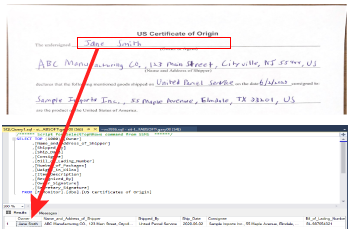
Explore AI's role in data management. Learn how to automate PDF imports into SQL tables, reduce manual data entry, and enhance accuracy with our guide.
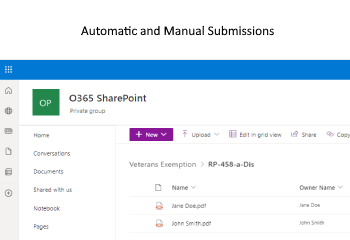
Discover how to streamline document transfers from your desktop to SharePoint using the DeskConnect
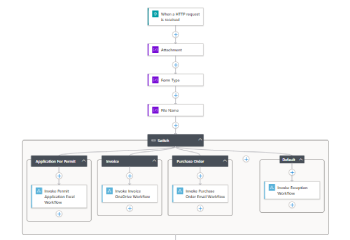
Explore how to harness AI's potential with Azure Logic Apps for efficient document processing. Streamline workflows and boost productivity.
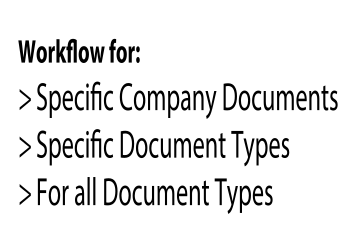
Unlock the power of Azure Form Recognizer with DeskConnect's Desktop Automation Driver for optimized document handling. Transform your workflow today!
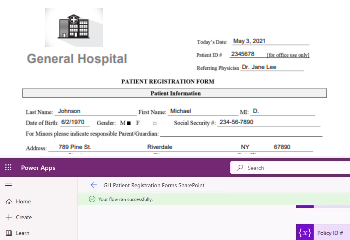
Unleash the power of Azure Form Recognizer for intelligent document processing. Learn to create, tra
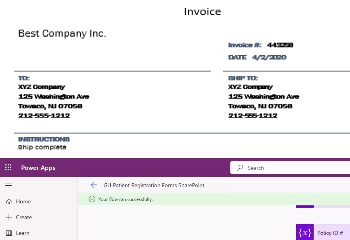
Discover the power of Azure Form Recognizer and Power Apps integration for efficient document processing. Revolutionize your workflow today!
Explore the integration of Azure Form Recognizer and Power Apps for efficient document processing. Enhance your workflow with our in-depth guide!
Discover how to unify multiple Azure Form Recognizer models for efficient document processing. Learn from our step-by-step guide!
Explore AI's transformative power in document processing. Learn how data extraction and automation streamline operations. Ready to transform your workflow? Start your free trial today.
<h2>Unlocking Business Efficiency with the SharePoint OCR Plugin</h2> <p>In the digital transformation landscape of 2025, <a rel="noopener" href="https://www.microsoft.com/en-us/microsoft-365/sharepoint/collaboration" target="_blank">Microsoft SharePoint</a> has solidified its role as a cornerstone for businesses worldwide, offering a secure platform for storing, organizing, sharing, and accessing information across devices. However, many organizations have yet to fully leverage its capabilities. The SharePoint OCR (Optical Character Recognition) plugin, such as <a rel="noopener" href="/solutions" target="_blank">FabSoft’s advanced document automation solutions</a>, revolutionizes document management by converting paper documents into searchable, digital formats within SharePoint libraries. This comprehensive guide explores how the SharePoint OCR plugin enhances efficiency, security, collaboration, and sustainability, empowering businesses in industries like healthcare, finance, and logistics to maximize their SharePoint investment and thrive in a data-driven world.</p> <h3>Understanding the SharePoint OCR Plugin</h3> <p>FabSoft’s SharePoint OCR plugin is a transformative tool designed to integrate seamlessly with <a rel="noopener" href="https://www.microsoft.com/en-us/microsoft-365/sharepoint/collaboration" target="_blank">Microsoft SharePoint</a>, supporting versions from 2007 onward, including SharePoint Online. Compatible with on-premises, cloud-based, or hybrid environments, it converts paper documents into searchable digital formats, enabling efficient management within SharePoint document libraries. Unlike basic scanning tools, the plugin leverages AI-driven OCR to extract critical data, such as invoice numbers, patient details, or contract terms, and route documents to the appropriate libraries, streamlining workflows.</p> <p>For example, a financial institution can scan vendor invoices, extract key data like payment amounts or due dates, and store them in a SharePoint library with indexed metadata, ensuring easy retrieval for accounting or audits. This versatility makes the plugin an essential extension for businesses seeking to enhance their SharePoint workflows, supporting diverse infrastructures and document types across industries.</p> <h3>Transformative Capabilities of the SharePoint OCR Plugin</h3> <p>The SharePoint OCR plugin stands out for its ability to go beyond simple digitization. By leveraging Artificial Intelligence (AI) and Machine Learning (ML), it intelligently extracts vital information and maps it to SharePoint’s managed metadata libraries and content types. When documents are uploaded, the indexed data is automatically attached to designated fields, simplifying organization and retrieval. For instance, a healthcare provider can scan patient intake forms, extract medical histories, and map them to SharePoint content types, enabling quick access for patient care or compliance audits.</p> <p>This automation reduces manual data entry, minimizes errors, and accelerates workflows, making it ideal for industries with high document volumes. The plugin’s ability to standardize naming conventions further enhances organization, ensuring documents are easily searchable. By streamlining these processes, the SharePoint OCR plugin transforms document management into a seamless, efficient operation.</p> <h3>Enhanced Security for Sensitive Documents</h3> <p>In 2025, data security is paramount, especially for sensitive documents like financial records or patient data. The SharePoint OCR plugin offers robust authentication methods, including ADFS, NTLM, web services, and forms-based authentication, as well as mixed-mode authentication for flexibility. These features ensure that only authorized users can access digitized documents, aligning with compliance requirements like GDPR or HIPAA.</p> <p><img src="/media/0q4apvxi/scan-directly-to-sharepoint-diagram.svg" alt="Scan Directly to SharePoint Diagram" width="497" height="500"></p> <p>For example, a legal firm can scan contracts and store them in a secure SharePoint library with restricted access, ensuring confidentiality and compliance. By integrating with <a rel="noopener" href="https://learn.microsoft.com/en-us/sharepoint/security-for-sharepoint-server" target="_blank">Microsoft’s SharePoint security features</a>, the plugin provides a trusted solution for businesses handling sensitive information, safeguarding data integrity and protecting against breaches.</p> <h3>Simplified Document Management with a User-Friendly Interface</h3> <p>The SharePoint OCR plugin features an intuitive interface that simplifies scanning and management from multiple sources, including network scanning devices, dedicated scanners, multifunction printers (MFPs), fax servers, network folders, and SharePoint WebDAV folders. This versatility ensures hassle-free document import, supporting diverse business workflows without complex setups.</p> <p>The plugin streamlines PDF creation and standardizes folder naming structures, enhancing organization. For instance, a logistics company can scan shipping forms, convert them to searchable PDFs, and store them in a SharePoint library with consistent names, making retrieval effortless. This user-friendly design reduces training requirements, enabling quick adoption across teams and boosting productivity.</p> <h3>Maximizing SharePoint’s Potential</h3> <p>Despite SharePoint’s widespread adoption, many organizations underutilize its capabilities. The SharePoint OCR plugin unlocks these features by automating document digitization, indexing, and routing, enabling businesses to fully leverage SharePoint’s potential. By reducing manual data entry, the plugin minimizes errors and saves time, allowing employees to focus on strategic tasks like client engagement or process optimization. This efficiency is critical for large enterprises managing thousands of documents daily, where manual processes are unscalable and error-prone.</p> <h3>Revolutionizing Document Accessibility and Searchability</h3> <p>The SharePoint OCR plugin transforms document accessibility by converting paper documents into searchable digital formats. Critical information, such as contract terms or patient records, is just a few clicks away, reducing search times. For example, a government agency can scan permit applications, extract key data, and store them in SharePoint with searchable metadata, streamlining audits or reviews. This enhanced searchability is invaluable for organizations where locating documents is time-consuming, improving efficiency and decision-making.</p> <h3>Enhancing Collaboration and Workflow Efficiency</h3> <p>Collaboration is essential in modern business environments, and the SharePoint OCR plugin enhances this by making digitized documents accessible across teams, regardless of location. Team members can share, review, and edit documents in real-time within SharePoint, accelerating workflows and decision-making. For instance, a project team can scan meeting notes, store them in a SharePoint library, and collaborate on action items, fostering teamwork and productivity. This real-time collaboration aligns with the needs of remote and hybrid workforces in 2025.</p> <h3>Cost-Effective and Sustainable Document Management</h3> <p>Adopting the SharePoint OCR plugin is both cost-effective and environmentally friendly. By reducing paper usage, businesses lower expenses related to printing, storage, and disposal, while minimizing their carbon footprint. For example, a financial institution digitizing client records can eliminate physical storage needs, saving costs and supporting sustainability goals. This aligns with the growing demand for eco-friendly practices, enhancing brand reputation and operational efficiency.</p> <h3>Customization and Scalability</h3> <p>The SharePoint OCR plugin offers extensive customization, allowing businesses to tailor indexing rules, metadata mappings, and workflows to their needs. As businesses grow, the plugin scales to handle increasing document volumes, ensuring long-term relevance. For instance, a small law firm can start with basic scanning and expand to complex workflows as its client base grows, making the plugin a future-proof investment.</p> <h3>The Role of AI and Machine Learning</h3> <p>AI and Machine Learning (ML) enhance the SharePoint OCR plugin’s capabilities, improving accuracy and adaptability. AI algorithms learn from data patterns, enabling the plugin to decipher handwritten text, recognize complex layouts, and support multiple languages. For example, a global enterprise can scan documents in various languages, and the plugin’s ML ensures accurate data extraction. This versatility streamlines workflows and supports data-driven decision-making, making the plugin a critical tool for diverse industries.</p> <h3>Conclusion</h3> <p>The <a rel="noopener" href="/solutions" target="_blank">SharePoint OCR plugin by FabSoft</a> is a vital tool for businesses leveraging <a rel="noopener" href="https://www.microsoft.com/en-us/microsoft-365/sharepoint/collaboration" target="_blank">Microsoft SharePoint</a>, enhancing document management with automation, security, and collaboration. By streamlining workflows, improving accessibility, and supporting sustainability, the plugin unlocks SharePoint’s full potential, driving efficiency and competitiveness in 2025. Contact <a rel="noopener" href="/contact-us/">FabSoft today</a> to explore how this solution can transform your document management and propel your business forward.</p>
Dive into Azure Logic Apps with our ultimate guide. Learn to manage data transfers, optimize document workflows, and master child flows. Ready to transform your automation? Start your free trial today.

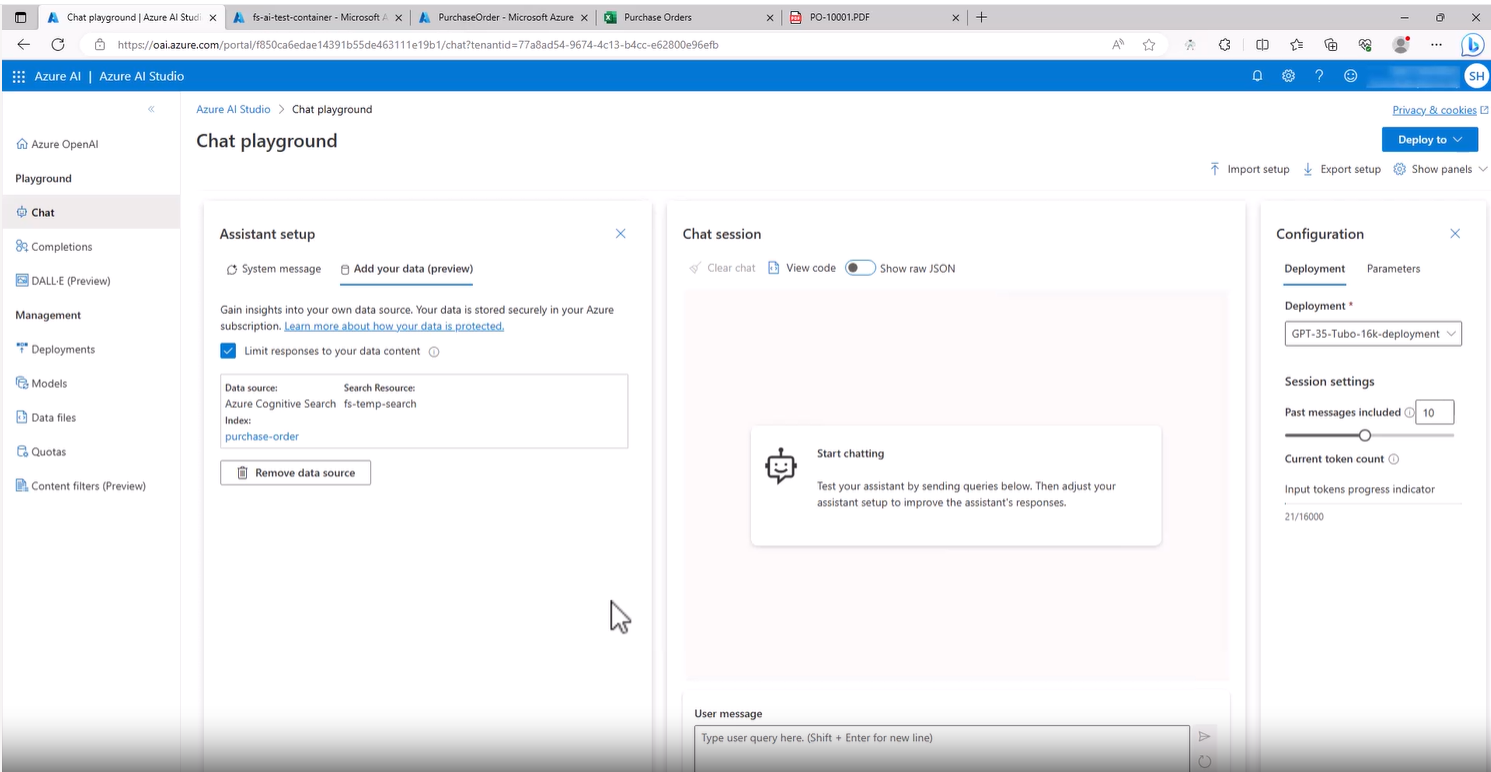
Master real-time updates in OpenAI using internal documents. Enhance your AI chat's performance with our step-by-step guide. Transform your AI experience!
Unlock enhanced efficiency with Power Apps! Streamline your workflow, optimize processes, and elevate productivity in your digital journey.
Unlock the future of efficiency with Logic App! Streamline your workflow, innovate processes, and elevate productivity like never before.
Unleash the power of Logic App to streamline your tasks! Dive into modern workflows that simplify processes, ensuring efficiency meets innovation.
Unlock the power of Azure's OpenAI Studio with our detailed guide. From setup to expert tips, navigate AI's transformative tool seamlessly. Dive in now!

Dive into Azure AI Document Intelligence Studio's features. From custom model creation to seamless integration, master document processing. Explore now!
<h2>Revolutionizing Document Management with Azure AI Document Intelligence Studio</h2> <p>In the di
<h2>Mastering Document Management with Azure AI Document Intelligence Model Merging</h2> <p>In the digital transformation landscape of 2025, businesses in industries like healthcare, finance, and logistics face the challenge of managing diverse document formats while ensuring efficient data extraction. <a rel="noopener" href="https://azure.microsoft.com/en-us/products/ai-services/ai-document-intelligence" target="_blank">Azure AI Document Intelligence Studio</a>, formerly Azure Form Recognizer, simplifies this by enabling the merging of multiple models to create a unified solution for processing varied document structures. This comprehensive guide explores the art of combining Document Intelligence models, handling form variations, and integrating with <a rel="noopener" href="/products/deskconnect-idc" target="_blank">FabSoft’s DeskConnect Desktop Automation Driver</a> and Microsoft PowerApps to optimize workflows. By mastering model merging, businesses can achieve consistent data extraction and streamline document management.</p> <h3>Introduction: The Art of Model Merging</h3> <p>Managing diverse form versions or structures containing similar data can be daunting, but Azure AI Document Intelligence Studio transforms this process by merging models to ensure seamless data extraction. This guide covers:</p> <ul> <li>The essence of merging models to create a unified processing framework.</li> <li>Recognizing and handling form variations for consistent data extraction.</li> <li>A step-by-step approach to model merging for optimized workflows.</li> </ul> <p>By leveraging Azure’s AI-driven capabilities, businesses can process documents like patient registration forms or invoices with precision, reducing manual effort and enhancing efficiency. This approach, supported by <a rel="noopener" href="https://learn.microsoft.com/en-us/azure/ai-services/document-intelligence/overview" target="_blank">Microsoft’s Document Intelligence overview</a>, empowers organizations to manage complex document workflows effectively.</p> <h3>Crafting Custom Models with Precision</h3> <p>Creating custom Document Intelligence models is the foundation of model merging. Businesses can tailor models to specific document types, such as patient registration forms, by defining required fields and annotating data within Azure AI Document Intelligence Studio. For example, a healthcare provider can create two separate models for different patient registration form templates, each capturing fields like patient IDs or medical histories.</p> <p>The brilliance of this approach lies in merging these models into a unified solution capable of processing both templates. This process begins by accessing the “Custom Model” segment via <a rel="noopener" href="https://portal.azure.com" target="_blank">Azure Portal</a>, selecting the appropriate subscription, Resource Group, and Document Intelligence service, and configuring storage preferences with a Blob container. The models are trained on sample documents, ensuring accurate data extraction, as outlined in <a rel="noopener" href="https://learn.microsoft.com/en-us/azure/ai-services/document-intelligence/how-to-guides/build-a-custom-model" target="_blank">Azure’s custom model creation guide</a>.</p> <h3>The Advantages of Model Composition</h3> <p>Merging models in Azure AI Document Intelligence Studio offers significant benefits:</p> <ul> <li><strong>Adaptability:</strong> Seamlessly integrate new form templates as needed, accommodating evolving document formats without retraining from scratch.</li> <li><strong>Time-Efficiency:</strong> Eliminate the need to train separate models for each form variation, saving time and resources.</li> <li><strong>Holistic Processing:</strong> The unified model extracts pivotal data from all form blueprints, ensuring consistency regardless of format differences.</li> </ul> <p>For instance, a financial institution can merge models for different invoice formats, ensuring accurate extraction of data like amounts or vendor details. This adaptability, supported by Azure’s AI-driven OCR and Machine Learning (ML), streamlines workflows and enhances scalability, making it ideal for industries with diverse document types.</p> <h3>Seamless Integration with DeskConnect</h3> <p>The unified model integrates seamlessly with <a rel="noopener" href="/products/deskconnect-idc" target="_blank">FabSoft’s DeskConnect Desktop Automation Driver</a>, creating a powerful workflow for document processing. When a document, such as a patient registration form, is submitted to DeskConnect, the Azure AI Document Intelligence model extracts vital data, which is then funneled into a Microsoft PowerApps flow. This flow populates an Excel datasheet in a <a rel="noopener" href="https://www.microsoft.com/en-us/microsoft-365/sharepoint/collaboration" target="_blank">SharePoint library</a>, ensuring organized, accessible data.</p> <p><img src="/media/dajdi2ec/weekly-hours-filing-documents-1.svg" alt="Weekly Hours Filing Documents" width="500" height="375"></p> <p>For example, a healthcare provider can process patient forms from multiple hospitals with different templates, extracting data consistently and storing it in SharePoint for real-time access. This integration reduces manual intervention, enhances accuracy, and supports compliance with regulations like HIPAA, making it a game-changer for document management.</p> <h3>Key Insights for Optimized Workflows</h3> <p>The integration of Azure AI Document Intelligence and DeskConnect provides key insights:</p> <ul> <li><strong>Streamlined Data Extraction:</strong> Azure’s model efficiently extracts and organizes data, ensuring precision across diverse formats.</li> <li><strong>Simplified Desktop Automation:</strong> DeskConnect simplifies processing, leveraging the unified model for optimal performance.</li> <li><strong>Versatility in Document Handling:</strong> The merged model handles varied formats of the same document type, streamlining workflows.</li> </ul> <p>For instance, a logistics company can merge models for shipping forms, extracting data like shipment IDs or delivery dates, and integrate it into PowerApps for real-time tracking. This versatility ensures efficiency and scalability across industries.</p> <h3>Additional Benefits of Azure AI Document Intelligence Studio</h3> <p>Azure AI Document Intelligence Studio offers a range of benefits:</p> <ul> <li><strong>Increased Productivity:</strong> Automation reduces manual processing, freeing employees for strategic tasks.</li> <li><strong>Cost Savings:</strong> Reduced labor and error-related costs deliver a strong ROI.</li> <li><strong>Improved Accuracy:</strong> AI-driven OCR and ML ensure precise data extraction.</li> <li><strong>Scalability:</strong> The platform handles growing document volumes, supporting businesses of all sizes.</li> <li><strong>Enhanced Collaboration:</strong> Integration with SharePoint and PowerApps enables real-time data sharing.</li> </ul> <h3>Conclusion</h3> <p><a rel="noopener" href="https://azure.microsoft.com/en-us/products/ai-services/ai-document-intelligence" target="_blank">Azure AI Document Intelligence Studio</a>, paired with <a rel="noopener" href="/products/deskconnect-idc" target="_blank">FabSoft’s DeskConnect</a> and Microsoft PowerApps, is a formidable force in document processing, enabling efficient model merging and streamlined workflows. Contact <a rel="noopener" href="/contact-us/">FabSoft for a consultation</a> to explore how this solution can revolutionize your document management in 2025.</p>
<h2>Enhancing Document Automation with Azure AI Document Intelligence and Power Platform</h2> <p>In the rapidly evolving digital landscape of 2025, businesses in industries like healthcare, finance, and logistics are leveraging Artificial Intelligence (AI) to streamline document processing and boost operational efficiency. <a rel="noopener" href="https://azure.microsoft.com/en-us/products/ai-services/ai-document-intelligence" target="_blank">Azure AI Document Intelligence</a>, paired with <a rel="noopener" href="https://www.microsoft.com/en-us/power-platform" target="_blank">Microsoft Power Platform</a> and enhanced by <a rel="noopener" href="/products/deskconnect-idc" target="_blank">FabSoft’s DeskConnect Desktop Automation Driver</a>, represents a transformative solution for automated document management. This comprehensive guide, inspired by the video “Unleash the Power of Azure AI Document Intelligence in Power Platform,” explores the advanced OCR and Machine Learning capabilities of Azure AI, the automation prowess of Power Platform, and DeskConnect’s role in bridging these technologies to revolutionize workflows.</p> <h3>Introduction: The Convergence of Azure AI, OCR, and Power Platform</h3> <p>Efficient document handling is paramount in today’s digital era, where businesses seek to minimize manual tasks and enhance data accuracy. The fusion of <a rel="noopener" href="https://azure.microsoft.com/en-us/products/ai-services/ai-document-intelligence" target="_blank">Azure AI Document Intelligence</a> with <a rel="noopener" href="https://www.microsoft.com/en-us/power-platform" target="_blank">Microsoft Power Platform</a>, enriched by Optical Character Recognition (OCR) and Large Language Models (LLMs), offers a robust solution for automated document processing. This guide covers:</p> <ul> <li>The advanced OCR capabilities of Azure AI Document Intelligence for precise data extraction.</li> <li>The adaptability of Microsoft Power Platform in leveraging Machine Learning for document automation.</li> <li>The critical role of <a rel="noopener" href="/products/deskconnect-idc" target="_blank">FabSoft’s DeskConnect</a> in integrating these technologies.</li> </ul> <p>By combining these tools, businesses can streamline document-centric processes, ensuring efficiency and accuracy across industries.</p> <h3>A Deeper Dive into Azure AI Document Intelligence</h3> <p><a rel="noopener" href="https://azure.microsoft.com/en-us/products/ai-services/ai-document-intelligence" target="_blank">Azure AI Document Intelligence</a> is a pinnacle of OCR and AI innovation, designed to process a wide array of documents with precision. Its advanced Machine Learning algorithms extract and analyze data from structured and unstructured documents, such as invoices, purchase orders, or medical forms, transforming how businesses manage information. For example, a healthcare provider can extract patient details from handwritten forms, ensuring accurate integration into an electronic health record (EHR) system.</p> <p><img src="/media/dajdi2ec/weekly-hours-filing-documents-1.svg" alt="Weekly Hours Filing Documents" width="500" height="375"></p> <p>The platform’s ability to recognize text in images, identify key-value pairs, and handle complex layouts eliminates the need for manual data entry. This precision, detailed in <a rel="noopener" href="https://learn.microsoft.com/en-us/azure/ai-services/document-intelligence/overview" target="_blank">Microsoft’s Document Intelligence overview</a>, is critical for industries like finance and healthcare, where data integrity is paramount.</p> <h3>Microsoft Power Platform: A Hub for Automation and Innovation</h3> <p><a rel="noopener" href="https://www.microsoft.com/en-us/power-platform" target="_blank">Microsoft Power Platform</a>, encompassing Power Apps, Power Automate, and Power BI, leverages LLMs and Machine Learning to create a dynamic environment for document automation. This suite enables businesses to craft customized solutions tailored to their needs, streamlining data collection, analysis, and workflow optimization. For instance, a logistics company can automate invoice processing, extracting data and routing it to a <a rel="noopener" href="https://www.microsoft.com/en-us/microsoft-365/sharepoint/collaboration" target="_blank">SharePoint library</a> for real-time access.</p> <p>Power Platform’s integration with Azure AI Document Intelligence enhances its capabilities, enabling seamless data processing and utilization. This versatility supports sectors like legal and finance, where automated workflows reduce administrative burdens and drive innovation. By leveraging Power Automate, businesses can create flows that process documents and trigger actions like email notifications or data updates, enhancing operational efficiency.</p> <h3>FabSoft Desktop Automation Driver</h3> <p><a rel="noopener" href="/products/deskconnect-idc" target="_blank">FabSoft’s DeskConnect Desktop Automation Driver</a> serves as a critical connector between Azure AI Document Intelligence and Microsoft Power Platform. By leveraging OCR and AI-driven algorithms, DeskConnect automates document processing, ensuring high efficiency and accuracy. For example, a financial institution can scan invoices, extract data like payment terms, and route it to a Power Apps flow for integration into SharePoint or Excel.</p> <p>This automation reduces errors and saves time, making DeskConnect an essential tool for industries with high document volumes. Its seamless integration with Azure and Power Platform ensures data reliability and consistency across systems, supporting compliance with regulations like GDPR or HIPAA.</p> <h3>Expanding the Reach of Document Automation</h3> <p>The integration of Azure AI Document Intelligence, Power Platform, and DeskConnect extends beyond process improvement, opening new possibilities for innovation. In customer service, automated document handling enhances response times by extracting data from inquiries and providing timely answers. For example, a retail business can process customer forms, extract details, and update CRM systems, improving service quality.</p> <p>In legal and regulatory compliance, the accuracy of document processing is critical. This solution ensures documents are processed in accordance with standards, mitigating risks and enhancing transparency. For instance, a legal firm can automate contract processing, extracting clauses and storing them in SharePoint for review, ensuring compliance and efficiency.</p> <h3>Additional Benefits</h3> <p>This powerful combination offers numerous benefits:</p> <ul> <li><strong>Increased Productivity:</strong> Automation reduces manual tasks, freeing employees for strategic work.</li> <li><strong>Cost Savings:</strong> Reduced labor and error-related costs deliver a strong ROI.</li> <li><strong>Improved Accuracy:</strong> AI-driven OCR and ML ensure precise data extraction.</li> <li><strong>Scalability:</strong> The system handles growing document volumes, supporting all business sizes.</li> <li><strong>Enhanced Collaboration:</strong> Integration with SharePoint enables real-time data sharing.</li> </ul> <h3>Conclusion</h3> <p>The integration of <a rel="noopener" href="https://azure.microsoft.com/en-us/products/ai-services/ai-document-intelligence" target="_blank">Azure AI Document Intelligence</a>, <a rel="noopener" href="https://www.microsoft.com/en-us/power-platform" target="_blank">Microsoft Power Platform</a>, and <a rel="noopener" href="/products/deskconnect-idc" target="_blank">FabSoft’s DeskConnect</a> marks a new era in document processing, delivering time efficiency and precision. Contact <a rel="noopener" href="/contact-us/">FabSoft for a consultation</a> to explore how this solution can revolutionize your document management in 2025.</p>

Explore how AI chatbots and DeskConnect revolutionize data analysis and document management, enhancing business efficiency and intelligence.

Explore FabSoft's AI Chatbot & Azure integration for secure, efficient document management. Boost collaboration & operational efficiency in business.

Explore FabSoft's Document Companion AI Chat, powered by ChatGPT. Streamline document management with easy import, OCR, and instant AI insights. Save time & boost efficiency.

Discover FabSoft's OCR technology for document management: Streamline processes with Document Companion, automate with DeskConnect, and enhance with AI.

Explore FabSoft's barcode solutions for business efficiency: Streamline document management and data processing with user-friendly tools.
<h2>Transforming PDF Management with FabSoft’s Document Companion</h2> <p>In the fast-paced digital landscape of 2025, businesses and individuals in industries like healthcare, finance, and logistics require efficient tools to manage PDF documents seamlessly. <a rel="noopener" target="_blank">FabSoft Technology’s</a> Document Companion is a cutting-edge solution that redefines PDF editing and management with its user-friendly interface, advanced editing tools, and AI-powered chat integration via <a rel="noopener" href="https://azure.microsoft.com/en-us/products/ai-services/openai-service" target="_blank">Azure OpenAI Service</a>. This comprehensive guide explores Document Companion’s capabilities, including simplified document import, effortless merging, and a robust editing toolkit, positioning it as a game-changer for streamlining document workflows and enhancing productivity.</p> <h3>Streamlining Document Import and Merging</h3> <p>Document Companion’s intuitive interface simplifies PDF management, making it accessible to users of all expertise levels. Importing documents is a straightforward process, allowing users to drag and drop files or utilize the unique printer driver for direct importation. This flexibility ensures that businesses can integrate documents from various sources, such as scanned forms or digital files, into a unified workflow.</p> <p><img src="/media/dajdi2ec/weekly-hours-filing-documents-1.svg" alt="Weekly Hours Filing Documents" width="500" height="375"></p> <p>For example, a financial institution can import invoices from multiple sources, streamline them into Document Companion, and prepare them for merging, advanced editing, or analysis. This efficiency reduces manual effort and ensures seamless document handling, making it ideal for high-volume workflows.</p> <h4>Effortless Document Merging</h4> <p>Merging multiple PDFs is a breeze with Document Companion’s drag-and-drop functionality. Users can combine files into a single, multipage document, rearranging pages as needed to create a cohesive file. For instance, a healthcare provider can merge patient forms from different departments into a unified PDF, ensuring all relevant data is consolidated for analysis or storage in a <a rel="noopener" href="https://www.microsoft.com/en-us/microsoft-365/sharepoint/collaboration" target="_blank">SharePoint library</a>. This versatility streamlines document management and enhances accessibility.</p> <h3>Advanced Document Enhancement Tools</h3> <p>Document Companion offers a comprehensive suite of editing tools to meet diverse needs:</p> <ol> <li><strong>Stamp Tool:</strong> Add images or signatures to personalize documents, such as adding a company logo to invoices or a digital signature to contracts.</li> <li><strong>Text Tools:</strong> Insert text using WAP Text and Quick Text tools, with customizable options like font size or color for professional formatting.</li> <li><strong>Easy Application and Saving:</strong> Apply changes with a single click and save documents as PDFs, ensuring a hassle-free editing process.</li> </ol> <p>For example, a legal firm can use the stamp tool to add signatures to contracts and the text tools to annotate key clauses, saving the final PDF for secure sharing. These tools, accessible through Document Companion’s intuitive interface, enhance efficiency and ensure professional-grade documents.</p> <h3>Revolutionary AI Chat and Sharing Features</h3> <h4>AI-Powered Insights</h4> <p>Document Companion’s AI Chat feature, powered by ChatGPT and <a rel="noopener" href="https://azure.microsoft.com/en-us/products/ai-services/openai-service" target="_blank">Azure OpenAI</a>, transforms it into a smart document assistant. After processing documents with Optical Character Recognition (OCR), the AI Chat provides intelligent insights, enabling users to query document content, such as invoice totals or contract terms. An OpenAI API key, configured via <a rel="noopener" href="https://learn.microsoft.com/en-us/azure/ai-services/openai/how-to/create-resource" target="_blank">Azure OpenAI’s setup guide</a>, is required for this feature.</p> <p>For instance, a logistics company can query delivery details from a multipage shipping form, receiving instant responses without manual review. This AI-driven analysis enhances decision-making and streamlines workflows, making Document Companion a powerful tool for data-driven industries.</p> <h4>Simplified Document Sharing</h4> <p>Sharing documents is effortless with Document Companion’s integrated Outlook button, enabling users to send PDFs directly via email. The OCR-powered ‘Click to Copy’ button allows easy extraction of text, including barcodes, for quick data sharing or entry. For example, a retail business can extract barcode data from an invoice and share it with the inventory team via Outlook, streamlining stock updates and collaboration.</p> <h3>A Comprehensive Editing Toolkit</h3> <p>Document Companion’s editing toolkit caters to every need, offering features like:</p> <ul> <li><strong>Highlighting:</strong> Emphasize important sections, such as key contract terms.</li> <li><strong>Redaction:</strong> Remove sensitive information for compliance, like patient data in healthcare.</li> <li><strong>Check/X Marks:</strong> Add marks for form completion or approvals.</li> <li><strong>Fill Box:</strong> Complete forms with ease, such as filling in customer details.</li> <li><strong>Notes:</strong> Insert annotations for clarity, like comments on a legal document.</li> <li><strong>Freehand Box:</strong> Add creative elements, such as sketches or diagrams.</li> </ul> <p>For instance, a finance team can highlight payment terms, redact sensitive client data, and add check marks to approve invoices, all within Document Companion. This comprehensive toolkit ensures flexibility and precision in document editing.</p> <h3>Additional Benefits of Document Companion</h3> <p>FabSoft’s Document Companion offers numerous benefits:</p> <ul> <li><strong>Increased Productivity:</strong> Automation and intuitive tools reduce manual tasks.</li> <li><strong>Cost Savings:</strong> Reduced labor and error-related costs deliver a strong ROI.</li> <li><strong>Improved Accuracy:</strong> OCR and AI-driven analysis ensure precise data handling.</li> <li><strong>Scalability:</strong> The system supports growing document volumes.</li> <li><strong>Enhanced Collaboration:</strong> Integration with SharePoint and Outlook enables real-time sharing.</li> </ul> <h3>Conclusion</h3> <p>FabSoft’s Document Companion marks a new era in PDF editing and management. Its intuitive design and comprehensive editing tools streamline workflows and boost productivity. Contact <a rel="noopener" href="/contact-us/">FabSoft for a consultation</a> or visit <a rel="noopener" href="/products/document-companion" target="_blank">Document Companion's product page</a> to explore how Document Companion can transform your document management in 2025.</p>
<h2>Revolutionizing Data Accessibility with FabSoft’s QR Code Solutions</h2> <p>In the fast-paced digital landscape of 2025, businesses in industries like retail, healthcare, and logistics are leveraging innovative technologies to streamline processes and enhance efficiency. QR Code technology, with its distinctive square shape and black-and-white pattern, surpasses traditional barcodes to become a cornerstone for data encoding and accessibility.This comprehensive guide explores the transformative impact of QR Codes, their industry-wide applications, technical advantages, and modern business use cases, empowering organizations to drive innovation and operational excellence.</p> <h3>QR Codes: A Paradigm Shift in Data Encoding</h3> <h4>The Advent of QR Code Technology</h4> <p>Initially developed in Japan for automotive tracking, QR Codes have evolved into a versatile tool across sectors like retail, marketing, and healthcare. Unlike one-dimensional barcodes, QR Codes are two-dimensional, capable of encoding complex data such as URLs, text, and geolocation information. FabSoft’s solutions leverage QR Codes to streamline document management, enabling businesses to encode and retrieve data efficiently.</p> <p>For example, a retail business can embed QR Codes on product packaging to provide instant access to product details or promotions, enhancing customer engagement. This versatility positions QR Codes as a critical tool for modern enterprises.</p> <h4>Broadening Industry Horizons</h4> <p>QR Codes have a profound impact across industries, optimizing operations and enhancing user experiences. In hospitality, QR Codes on menus link to digital ordering systems, improving customer interactions. In logistics, they streamline package tracking, while in government services, they enable secure access to digital records. This adaptability makes QR Codes indispensable for businesses seeking efficiency and innovation.</p> <h4>User Experience and Data Capacity</h4> <p>QR Codes offer a substantial data capacity, encoding over 3,000 alphanumeric characters, far surpassing traditional barcodes. This allows businesses to store complex information, such as website links or contact details, in a single code. Their user-friendly nature enables seamless transitions between physical and digital mediums, as users can scan codes with smartphones to access data instantly.</p> <h4>Reliability Through Error Correction</h4> <p>QR Codes feature an error correction mechanism that ensures functionality even if partially damaged, making them reliable in challenging environments like warehouses or medical facilities. For instance, a scratched QR Code on a shipping label can still be scanned, ensuring data integrity. This durability enhances their applicability across industries.</p> <h4>Compact and Efficient Data Storage</h4> <p>The space efficiency of QR Codes allows large amounts of data to be stored in a compact format, ideal for industries like electronics and pharmaceuticals where space is limited. For example, a pharmaceutical company can embed QR Codes on medication labels to encode dosage instructions, improving patient safety and compliance.</p> <h3>Industry-Wide Impact of QR Codes</h3> <p>QR Codes, integrated with FabSoft’s solutions, have reshaped business practices and document management across various sectors, enhancing efficiency and user engagement.</p> <h4>Retail and Marketing</h4> <p>In retail and marketing, QR Codes transform customer engagement by linking to product information, discounts, or promotions in advertisements and packaging. For instance, a retail store can use QR Codes on flyers to direct customers to online catalogs, driving sales and enhancing brand interaction. FabSoft’s tools streamline QR Code creation and scanning, ensuring seamless integration into marketing workflows.</p> <h4>Healthcare</h4> <p>In healthcare, QR Codes streamline patient care and data management. Medical facilities use QR Codes on wristbands, medication labels, and records to ensure accurate identification and access to medical histories. For example, a hospital can scan a patient’s QR Code to retrieve treatment details, improving care coordination and compliance with HIPAA regulations.</p> <h4>Logistics and Supply Chain</h4> <p>QR Codes optimize logistics and supply chain operations by enabling efficient inventory management, package tracking, and asset authentication. A logistics company can use QR Codes to track shipments in real time, reducing errors and improving transparency. Integration with <a rel="noopener" href="https://www.microsoft.com/en-us/microsoft-365/sharepoint/collaboration" target="_blank">Microsoft SharePoint</a> via FabSoft’s solutions ensures data is accessible across teams, enhancing collaboration.</p> <h3>Technical Advantages of QR Codes</h3> <p>QR Codes offer several technical advantages that enhance their effectiveness:</p> <h4>Fast Scanning and Readability</h4> <p>QR Codes can be scanned quickly using smartphones or barcode scanners, providing instant access to encoded data. Their high-contrast pattern ensures reliable readability across devices and environments, making them ideal for dynamic settings like retail or logistics.</p> <h4>Dynamic Data Encoding</h4> <p>Unlike static traditional barcodes, QR Codes support dynamic data encoding, allowing updates to information like URLs or event schedules. For example, a marketing team can update a QR Code’s linked content without redesigning the code, ensuring flexibility and real-time communication.</p> <h4>Customizable Design and Branding</h4> <p>Businesses can customize QR Code designs with logos, colors, or visual elements to align with brand identity. For instance, a retail brand can embed its logo in a QR Code on product packaging, enhancing brand recognition while maintaining functionality.</p> <h4>Security and Data Encryption</h4> <p>QR Codes support encryption, protecting sensitive data like payment details or medical records. This ensures secure data handling, critical for industries with stringent compliance requirements. FabSoft’s solutions enhance this security by integrating with secure platforms like SharePoint.</p> <h3>QR Codes in Modern Business Applications</h3> <p>QR Codes are increasingly prevalent in modern business applications, driving efficiency and innovation:</p> <h4>Contactless Payments and Transactions</h4> <p>QR Codes enable secure, contactless payments by linking to payment gateways, allowing customers to pay via smartphone scans. For example, a retail store can generate QR Codes for quick checkouts, enhancing customer convenience and reducing transaction times.</p> <h4>Event Ticketing and Registration</h4> <p>QR Codes streamline event ticketing by providing paperless solutions. Attendees receive QR Code tickets via email or apps, scanned at venues for seamless entry. This efficiency benefits event organizers in hospitality or entertainment sectors.</p> <h4>Product Tracking and Authentication</h4> <p>In manufacturing and retail, QR Codes ensure product authenticity and tracking. Each product can have a unique QR Code linking to its origin or manufacturing details, combating counterfeits and ensuring supply chain transparency.</p> <h4>Marketing Campaigns and Customer Engagement</h4> <p>QR Codes enhance marketing campaigns by linking to websites, videos, or social media profiles, driving customer engagement. For example, a marketing team can embed QR Codes in print ads to direct customers to exclusive offers, boosting sales and brand loyalty.</p> <h3>Conclusion</h3> <p>QR Code technology, integrated with <a rel="noopener" href="/products/deskconnect-idc" target="_blank">FabSoft’s DeskConnect</a>, revolutionizes data encoding and accessibility, transforming industries from retail to healthcare. By offering robust data capacity, error correction, and customizable designs, QR Codes drive efficiency and innovation. Contact <a rel="noopener" href="/contact-us/">FabSoft for a consultation</a> to explore how these solutions can streamline your document management and enhance business operations in 2025.</p>

Discover how to create custom AI prompts in Power Apps with our step-by-step guide. Enhance document processing and embrace AI-driven solutions.

Explore FabSoft Document AI's use of RAG and Azure for AI model enhancement, focusing on token costs, query complexity, and efficient data retrieval.
<h2>Transforming Global Communication with AI Translate in Microsoft Power Apps</h2> <p>In the interconnected digital landscape of 2025, businesses in industries like healthcare, finance, and logistics rely on seamless communication to thrive in global markets. The AI Translate feature in <a rel="noopener" href="https://powerapps.microsoft.com" target="_blank">Microsoft Power Apps</a>, powered by <a rel="noopener" href="https://azure.microsoft.com/en-us/products/ai-services/openai-service" target="_blank">Azure OpenAI Service</a> and enhanced by <a rel="noopener" href="/products/deskconnect-idc" target="_blank">FabSoft’s DeskConnect Desktop Automation Driver</a>, revolutionizes business communication by integrating AI-generated translations into workflows. This comprehensive guide explores how AI Translate leverages AI and machine learning to enable multilingual support, streamline document processing, and enhance customer engagement, empowering businesses to drive efficiency and innovation.</p> <h3>Introduction to AI Translate in Power Apps</h3> <p><a rel="noopener" href="https://powerapps.microsoft.com" target="_blank">Microsoft Power Apps</a>, a low-code platform for creating custom business applications, has become essential for businesses worldwide. The AI Translate feature extends its capabilities by enabling seamless multilingual support, allowing users to incorporate translations into applications effortlessly. This functionality, supported by <a rel="noopener" href="https://learn.microsoft.com/en-us/azure/ai-services/openai/how-to/create-resource" target="_blank">Azure OpenAI’s resource creation guide</a>, ensures businesses can communicate effectively across diverse linguistic backgrounds, enhancing global operations.</p> <h4>The Role of AI and Machine Learning</h4> <p>AI and machine learning are at the core of AI Translate, utilizing sophisticated algorithms to deliver accurate translations. By analyzing vast linguistic datasets, these algorithms continuously improve translation quality, ensuring precision and cultural relevance. For example, a healthcare provider can translate patient communications into multiple languages, ensuring clarity and compliance with regulations like HIPAA.</p> <h3>Streamlining Workflows with AI-Generated Translations</h3> <p>AI Translate in Power Apps streamlines workflows by integrating translations into automated processes. For instance, a workflow can generate a Purchase Order summary email with translated text, such as in French, using the ‘translate text into another language’ action. By specifying recipients and saving the flow, businesses can process documents through <a rel="noopener" href="/products/deskconnect-idc" target="_blank">DeskConnect</a>, which routes data to Power Apps for translation and email delivery.</p> <p><img src="/media/dajdi2ec/weekly-hours-filing-documents-1.svg" alt="Weekly Hours Filing Documents" width="500" height="375"></p> <p>For example, a logistics company can send multilingual delivery confirmations, ensuring clients receive accurate information in their native language. This automation, integrated with <a rel="noopener" href="https://www.microsoft.com/en-us/microsoft-365/sharepoint/collaboration" target="_blank">Microsoft SharePoint</a>, reduces manual effort and ensures consistency, enhancing operational efficiency.</p> <h4>Automating Multilingual Communication</h4> <p>By automating translations within Power Apps workflows, businesses streamline communication with global clients, partners, and employees. This reduces time and resources spent on manual translations while ensuring accuracy. For instance, a finance team can automate invoice notifications in multiple languages, ensuring timely and clear communication with international vendors.</p> <h4>Improving Customer Engagement</h4> <p>Effective communication in customers’ native languages builds trust and fosters long-term relationships. AI Translate enables personalized, localized messages, such as tailored support emails or promotional offers. For example, a retail business can send multilingual order confirmations, improving customer satisfaction and engagement in global markets.</p> <h3>Flexibility in Workflow Design with Power Apps</h3> <p>AI Translate offers unparalleled flexibility in workflow design, allowing users to add multiple translations within a single flow. For instance, a business can include Spanish translations alongside French in an email, accommodating diverse linguistic needs. This adaptability is crucial for global operations, ensuring effective communication across regions.</p> <h4>Customization for Diverse Business Needs</h4> <p>Power Apps enables users to customize workflows to meet specific requirements. With AI Translate, businesses can tailor communications to regional dialects or cultural preferences, ensuring relevance. For example, a healthcare provider can customize patient appointment reminders for different linguistic communities, enhancing accessibility and engagement.</p> <h4>Seamless Document Translation and Processing</h4> <p>Integrating Power Apps with <a rel="noopener" href="/products/deskconnect-idc" target="_blank">DeskConnect</a> enables seamless document translation and processing. Documents, such as purchase orders, can be translated into multiple languages based on predefined rules, ensuring efficient communication across global teams. This integration streamlines workflows and supports compliance with international standards.</p> <h3>Practical Applications</h3> <p>AI Translate in Power Apps offers practical applications across industries:</p> <ul> <li><strong>Customer Support:</strong> Automate multilingual responses to customer inquiries, improving response times and satisfaction.</li> <li><strong>Global Marketing:</strong> Deliver localized promotional content, enhancing brand engagement in diverse markets.</li> <li><strong>Compliance Documentation:</strong> Translate regulatory documents for international compliance, ensuring accuracy and adherence to standards like GDPR.</li> </ul> <h3>Future Developments and Considerations</h3> <p>As AI technology evolves, AI Translate in Power Apps will likely see advancements in natural language processing, enabling more accurate and nuanced translations. Integration with Microsoft Teams and SharePoint could enhance collaboration by translating real-time chat messages or documents in SharePoint libraries. Future iterations may also expand language support and offer localization for cultural nuances, catering to global markets.</p> <p>Businesses must address data privacy, security, and ethical considerations, implementing robust measures to ensure compliance with regulations and maintain trust in AI-driven processes.</p> <h3>Additional Benefits</h3> <p>AI Translate in Power Apps offers numerous benefits:</p> <ul> <li><strong>Increased Productivity:</strong> Automation reduces manual translation tasks.</li> <li><strong>Cost Savings:</strong> Reduced labor and error-related costs deliver a strong ROI.</li> <li><strong>Improved Accuracy:</strong> AI-driven translations ensure precision.</li> <li><strong>Scalability:</strong> Supports growing communication needs.</li> <li><strong>Enhanced Collaboration:</strong> Enables multilingual data sharing via SharePoint.</li> </ul> <h3>Conclusion</h3> <p><a rel="noopener" href="https://powerapps.microsoft.com" target="_blank">Microsoft Power Apps</a> with AI Translate, powered by <a rel="noopener" href="https://azure.microsoft.com/en-us/products/ai-services/openai-service" target="_blank">Azure OpenAI</a> and enhanced by <a rel="noopener" href="/products/deskconnect-idc" target="_blank">FabSoft’s DeskConnect</a>, transforms global business communication. Contact <a rel="noopener" href="/contact-us/">FabSoft for a consultation</a> to explore how this solution can drive innovation in 2025.</p>
Stop wasting hours searching for files. AI File Pro reads & organizes any document type - PDFs, Word, Excel, scans - intelligently.
Unlike cloud AI services, AI File Pro processes documents locally. Perfect for healthcare, legal & regulated industries.
Automate paper pal workflows with enterprise-grade OCR and routing.
Automate paper pal workflows with enterprise-grade OCR and routing.
End file chaos. AI File Pro intelligently sorts PDFs, Word docs, Excel files & images. Works with SharePoint, Google Drive.
Unlike cloud AI tools, AI File Pro processes documents locally. Perfect for healthcare, legal & regulated industries.
Automate paper pal workflows with enterprise-grade OCR and routing.
Automate paper pal workflows with enterprise-grade OCR and routing.
Automate omegleme workflows with enterprise-grade OCR and routing.
Automate omegleme workflows with enterprise-grade OCR and routing.
Tired of "Document_Final_v3.pdf"? AI File Pro reads & sorts any file type automatically. No more folder hunting.
Why choose on-premises file organization? AI File Pro processes your PDFs, Word docs, Excel files & images locally - your sensitive data never leaves your infrastructure.
End "Document_Final_v3.pdf" nightmares. AI File Pro reads and intelligently sorts any file type automatically.
Manual file sorting is killing productivity. See how AI File Pro eliminates folder hunting with intelligent organization.
Automate omegleme workflows with enterprise-grade OCR and routing.
Automate omegleme workflows with enterprise-grade OCR and routing.
AI File Pro reads file contents & organizes PDFs, docs, images intelligently. No more 'Document_Final_v3.pdf' chaos.
Discover how AI eliminates hours of manual file sorting. Processes large batches quickly with enterprise-grade security.
Automate paper pal workflows with enterprise-grade OCR and routing.
Automate paper pal workflows with enterprise-grade OCR and routing.
Tired of digging through messy folders? AI reads your files and organizes them intelligently. Works with SharePoint, Google Drive, any system.
Worried about AI data privacy? AI File Pro processes documents on your servers. SOC 2 & GDPR compliant with full data control.
Tired of hunting through folders? AI File Pro reads & understands your files to organize them automatically. 25+ years trusted.
Skip risky cloud AI platforms. AI File Pro organizes credentials, configs & NDA files securely on your network. SOC 2 compliant.
Automate paper pal workflows with enterprise-grade OCR and routing.
Automate paper pal workflows with enterprise-grade OCR and routing.
AI File Pro reads file contents & automatically sorts PDFs, Word docs, Excel files by topic. Works with SharePoint, Google Drive.
Unlike ChatGPT & cloud tools, AI File Pro processes sensitive files locally. Perfect for credentials, configs & NDA-covered content.
Automate omegleme workflows with enterprise-grade OCR and routing.
Tired of digging through messy folders? AI reads your files and organizes them intelligently. Works with SharePoint, Google Drive, any system.
Worried about AI data privacy? AI File Pro processes documents on your servers. SOC 2 & GDPR compliant with full data control.
Tired of hunting through folders? AI File Pro reads & understands your files to organize them automatically. 25+ years trusted.
Skip risky cloud AI platforms. AI File Pro organizes credentials, configs & NDA files securely on your network. SOC 2 compliant.
Automate paper pal workflows with enterprise-grade OCR and routing.
Automate paper pal workflows with enterprise-grade OCR and routing.
AI File Pro reads file contents & automatically sorts PDFs, Word docs, Excel files by topic. Works with SharePoint, Google Drive.
Unlike ChatGPT & cloud tools, AI File Pro processes sensitive files locally. Perfect for credentials, configs & NDA-covered content.
Automate omegleme workflows with enterprise-grade OCR and routing.
Stop wasting hours hunting through messy folders. AI File Pro reads your PDFs, Word docs & images to organize them intelligently.
Unlike cloud AI tools, AI File Pro processes sensitive documents on-premises. HIPAA & SOC 2 compliant with complete data control.
Tired of 'Document_Final_v3.pdf'? AI File Pro reads content and organizes files intelligently across SharePoint, Google Drive.
my team was drowning in document chaos until we found this. ai file pro reads file contents and sorts everything intelligently
AI File Pro eliminates file chaos by reading content & organizing intelligently. Works with PDFs, Word docs, images - any file type.
Does cloud sync ever frustrate you when files disappear or move unexpectedly? AI File Pro keeps your files exactly where you put them while organizing intelligently behind the scenes.
Tired of 'Document_Final_v3.pdf'? AI File Pro reads file contents and organizes everything intelligently. Works with any file type.
Unlike cloud solutions that move files around, AI File Pro organizes intelligently while files stay exactly where you put them.
IT Directors: According to recent industry research, manual file organization burns 2+ hours daily. AI File Pro reads, sorts, and renames any document type automatically.
finally found something that actually works. processes pdfs, images, word docs - reads the content and puts everything where it belongs
been there. 7 years of accumulated file chaos, no naming conventions. ai file pro actually reads what's inside files to organize them properly
Automate image composite editor workflows with enterprise-grade OCR and routing.
Automate image composite editor workflows with enterprise-grade OCR and routing.
Automate image composite editor workflows with enterprise-grade OCR and routing.
Automate image composite editor workflows with enterprise-grade OCR and routing.
Operations teams at a leading manufacturer slashed document processing from hours to minutes. See how AI File Pro transforms workflows.
Your team wastes 30+ minutes daily finding files. AI File Pro automatically organizes any file type using content intelligence.
Tired of 'Document_Final_v3.pdf' and endless folder hunting? AI reads your files and organizes them intelligently. Works with SharePoint.
Automate image composite editor workflows with enterprise-grade OCR and routing.
Automate image composite editor workflows with enterprise-grade OCR and routing.
Automate image composite editor workflows with enterprise-grade OCR and routing.
Automate image composite editor workflows with enterprise-grade OCR and routing.
AI File Pro reads & understands your files to organize them intelligently. Works with SharePoint, Google Drive & network folders.
Process medical files with AI while keeping PHI on your network. No cloud upload risks - HIPAA compliant document organization.
AI reads file contents & organizes intelligently. Works with SharePoint, Google Drive. SOC 2 compliant. 1GB free forever.
Unlike cloud AI tools, AI File Pro processes documents locally. HIPAA compliant with complete audit trails. Try 1GB free.
Tired of hunting through folders for the right file? AI File Pro reads your documents and organizes them intelligently. End file chaos.
Healthcare organizations need AI document processing but can't risk HIPAA violations. AI File Pro processes on-premises - PHI never leaves.
Tired of hunting through folders? AI File Pro reads your files and organizes them intelligently. Works with any file type.
Manual file sorting is killing productivity. Our AI reads file contents and organizes everything automatically. HIPAA compliant.
End file chaos. AI File Pro reads & sorts PDFs, docs, images into organized folders. 500+ formats supported.
Cut file processing time 90%. AI File Pro automatically sorts PDFs, Word docs, Excel files by content. Try free →
Automate image composite editor workflows with enterprise-grade OCR and routing.
Automate image composite editor workflows with enterprise-grade OCR and routing.
Unlike cloud AI tools, AI File Pro processes documents locally. HIPAA compliant with complete audit trails. Try 1GB free.
Tired of hunting through folders for the right file? AI File Pro reads your documents and organizes them intelligently. End file chaos.
Healthcare organizations need AI document processing but can't risk HIPAA violations. AI File Pro processes on-premises - PHI never leaves.
Tired of hunting through folders? AI File Pro reads your files and organizes them intelligently. Works with any file type.
Manual file sorting is killing productivity. Our AI reads file contents and organizes everything automatically. HIPAA compliant.
End file chaos. AI File Pro reads & sorts PDFs, docs, images into organized folders. 500+ formats supported.
Cut file processing time 90%. AI File Pro automatically sorts PDFs, Word docs, Excel files by content. Try free →
Stop the endless folder diving. AI File Pro automatically sorts, renames & organizes any file type. 1GB free forever.
Healthcare & legal teams: organize sensitive files with AI that never leaves your network. Enterprise security built-in.
Transform messy folders into organized systems. AI File Pro reads & sorts any file type automatically. 1GB free forever.
Advanced AI reads file contents & creates intelligent folder structures. HIPAA compliant, stays on your systems. Try free.
AI File Pro reads, sorts & renames your messy documents automatically. SharePoint, network drives, any file type. Try free →
Organizations waste 40-60% of document processing time on manual work. AI File Pro automates it all. See how →
AI reads & organizes any file type. 50+ formats supported. Enterprise security.
Automatically rename & sort messy files using AI content analysis. Any file type.
Stop digging through messy folders. AI File Pro reads & organizes any file type automatically. 98% OCR accuracy, processes 1,000+ files/hour.
Enterprise-grade AI reads documents, extracts data & organizes intelligently. HIPAA/SOC2 compliant. On-premises security - files never leave your network.
Stop the endless folder hunting. AI reads, sorts & renames your messy documents automatically. On-premises security meets intelligent organization.
Your sensitive files never leave your network. Local AI processing delivers smart organization without compromising security or compliance.
AI reads & organizes any file type. SharePoint, network drives, cloud storage. Try free.
Eliminate messy file names & folders. AI processes batches of documents instantly.
we had 10k+ messy files across sharepoint and network drives. ai file pro reads content and organizes everything intelligently.
healthcare teams using our on-premises ai avoid those accidental phi exposures from confusing file names. intelligent auto-classification.
AI automatically reads, sorts & renames messy files. 50+ file types supported.
Watch AI read file contents and organize automatically. See demo now.
AI File Pro automatically sorts, renames & organizes any file type. Works with SharePoint, network drives. Windows-native, no WSL2 issues.
Transform messy files into organized systems. AI File Pro reads PDFs, images, Word docs & auto-classifies. Integrates with existing workflows.
AI File Pro reads every document and creates organized folders automatically.
AI File Pro reads every document and creates organized folders automatically.
AI File Pro reads every document and creates organized folders automatically.
AI File Pro reads every document and creates organized folders automatically.
AI File Pro reads every document and creates organized folders automatically.